
Resize Me! Pro - Photo resizer
----使い方-----
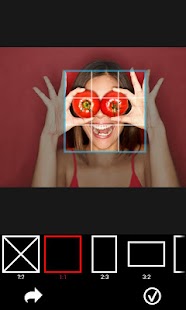
*'Resize Me!'を起動 写真を開く又はカメラから撮る 回転、クロプ、リサイズ 共有又は保存
* あなたのビューアから起動(例えばギャラリー) 画像を選択或いはオープン "共有"か或いは "それを送信"をタップ、そして'Resize Me!'を選択 画像サイズを選択 あなたが結果を開くために使用したいアプリケーションを選択し
* メールアプリから起動 アタッチボタンをタップ 'Resize Me!'を選択 あなたのビューアを選択(例えばギャラリー) 画像を選択(または画像のリスト) 画像サイズを選択
---機能---
* カスタムサイズ* 使いやすい* EXIFタグを保持* GPSのデータを保持* 回転とクロップ* 壁紙として設定* 結果を共有または保存
---フルバージョンでのみ使用可能
* 複数の画像のサイズを変更* テキストのウォーターマーク
Facebook: http://www.facebook.com/xnviewTwitter: http://www.twitter.com/xnviewG+: http://plus.google.com/+xnview/
About Resize Me! Pro - Photo resizer
- Package name (App ID)
- com.xnview.XnResize
- Available on
- Google Play
- Price
- $1.49
- Developer
- XnView
Looking for the Resize Me! Pro - Photo resizer APK?
The safest way to get Resize Me! Pro - Photo resizer (com.xnview.XnResize) on your Android device is to install it directly from Google Play — you'll always get the latest official version, automatic updates, and no risk of modified or infected APK files from third-party sites.

Social Features
Connect and share with friends and the community.
Camera Features
Advanced camera features with editing capabilities.
Fitness Tracking
Track your workouts and monitor your health metrics.
Resize Me! Pro - Photo resizer の動作を見る


ユーザーの評価
私たちの言葉だけを信じないでください。このAndroidアプリについてユーザーが何と言っているかをご覧ください。
"Easy to use"
"One of the best photo resizing app I have ever used. And I have been using this app for a long time."
"Stopped working and offers advert to other app"
"This app is excellent and works extremely quickly, try the 50% reduction which is superb for web use etc. So inexpensive and saves hours of trying out apps which are laden with adverts"
"Good app but after I bought it the ability to take photos directly from the app was removed :( For what I'm using it for this is a major slowdown in my workflow"
"I have been using the Pro version for some time now without problems. But recently I have had an issue with resized images not being successfully saved. Brought the issue up with the dev, who was extremely helpful in rectifying the problem. All good again, thank you. The app is back doing what it does very well."
"Needs the ability to truly batch folders of photos not just individual folders , to save in the original folders and also give the option to delete the originals. Other than that, it works well."
"Awesome.I loved it.Thanks."
"Purchased the pro , worked for 2 batches then stopped saving photos into any folder. No error message."
"Love it .. user interface looks from late 90's"
Frequently Asked Questions
Is Resize Me! Pro - Photo resizer free?
Resize Me! Pro - Photo resizer is a paid app — it costs $1.49 on Google Play. You pay once through your Google account and can install it on your Android devices.
How do I install Resize Me! Pro - Photo resizer on Android?
Open Google Play on your Android phone or tablet, search for Resize Me! Pro - Photo resizer by XnView or tap the Google Play button on this page, then tap Install. The app downloads and installs automatically.
What is com.xnview.XnResize?
com.xnview.XnResize is the App ID (package name) of Resize Me! Pro - Photo resizer on Google Play. Every Android app has a unique package name, and it is the safest way to verify you are installing the official app.
Is Resize Me! Pro - Photo resizer safe to download?
Installing Resize Me! Pro - Photo resizer from Google Play is the safest option: you get the official version published by XnView, verified by Google Play Protect, with automatic updates. Avoid APK files from unofficial third-party sites.

Get Resize Me! Pro - Photo resizer Today
Resize Me! Pro - Photo resizer for Android — $1.49 on Google Play.
Compatible with Android phones and tablets — available on Google Play.